Engage with Google on New Features of Google Messages Through Official Chat
Have you ever wished for a platform to discuss all the latest features of the Google Messages app? While such topics may not dominate casual conversations, dedicated fans of the app will soon have a unique opportunity to engage directly with Google. The tech giant is currently piloting an official chat group that enables users to communicate about new features and enhancements within Google Messages.
Join the Google Messages Chat Group
If you are an enthusiast of the Google Messages app and a beta tester, you'll be thrilled to learn about the new chat group being tested by Google. This will provide a direct line to discussions about the app's latest updates. Users can opt into this chat by responding to a prompt that appears at the top of their messages list within the app.
How to Participate in the Google Messages Chat
To join the new chat, simply look for a card at the top of your messages list that invites you to join the official Google Messages chat. You will have the option to either decline or accept the invitation. Choosing to accept will grant you access to a new RCS chat, where you can interact with an AI-powered chatbot to discuss the latest Google Messages features. Once the feature fully rolls out, this will open up exciting avenues for dialogue with Google about the app.
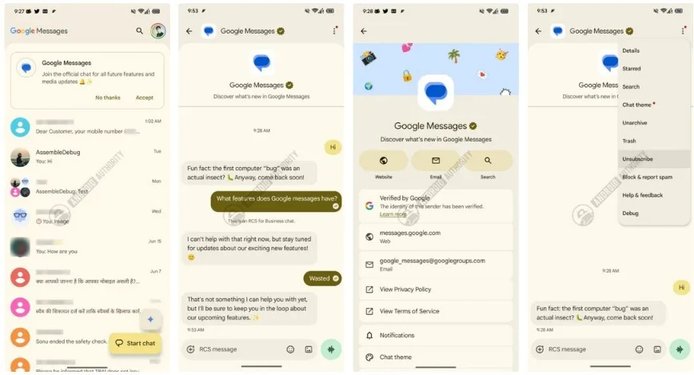
What this new Google Messages chat will look like. | Image by Android Authority
Joining this chat could enable you to ask questions about how new features can enhance your messaging experience. Although it currently appears that the focus will be exclusively on Google Messages, there is potential for it to expand to discussions about other Google services and apps in the future. Additionally, you will have the freedom to unsubscribe at any time if you choose to move on.
Continuous Improvement at Google
Google is always striving to upgrade its core applications, focused on enhancing user experience with useful features. Google Messages, in particular, is known for implementing user-friendly changes to its interface, contributing to its status as the leading messaging app on Android, with 1.2 billion monthly active users globally and 750 million daily active users.
How to Become a Google Messages Beta Tester
If you’re interested in becoming a Google Messages beta tester, simply open the Play Store app and search for Google Messages. Scroll down to find the option that says "Join the beta." Tap on it, and confirm your selection in the pop-up. Note that if the beta program is at capacity, the "Join" button will be disabled, requiring you to check back later.
If you haven’t already installed Google Messages on your Android device, you can do so by clicking this link to download it from the Google Play Store. As of now, it remains unclear when this feature will be officially launched.
For those who have experienced Android since its inception, the journey from carrier-specific messaging apps to Google Messages highlights the evolution of communication technology.