In a disturbing development for Android users, a recently upgraded version of the RedHook malware has emerged, capable of not just spying on users but also taking complete control of their devices. Initially targeting Vietnam, this insidious banking trojan has now spread to Indonesia, exploiting a common debugging tool to gain unprecedented access to victims' smartphones and drain their bank accounts.
RedHook Evolves: A New Level of Threat
The method of infiltration remains alarmingly simple. Cybercriminals impersonate bank representatives or government officials through various communication channels, convincing victims to download an APK from a deceptive website designed to look like the Google Play Store. Once installed, RedHook requests Accessibility permissions and manipulates Developer options autonomously, enabling wireless debugging. This act permits the malware to couple with the device as a trusted computer, granting it shell-level access typically reserved for legitimate software.
The following image provides an illustrative breakdown of RedHook's progression from a seemingly harmless app to gaining complete control of the phone:
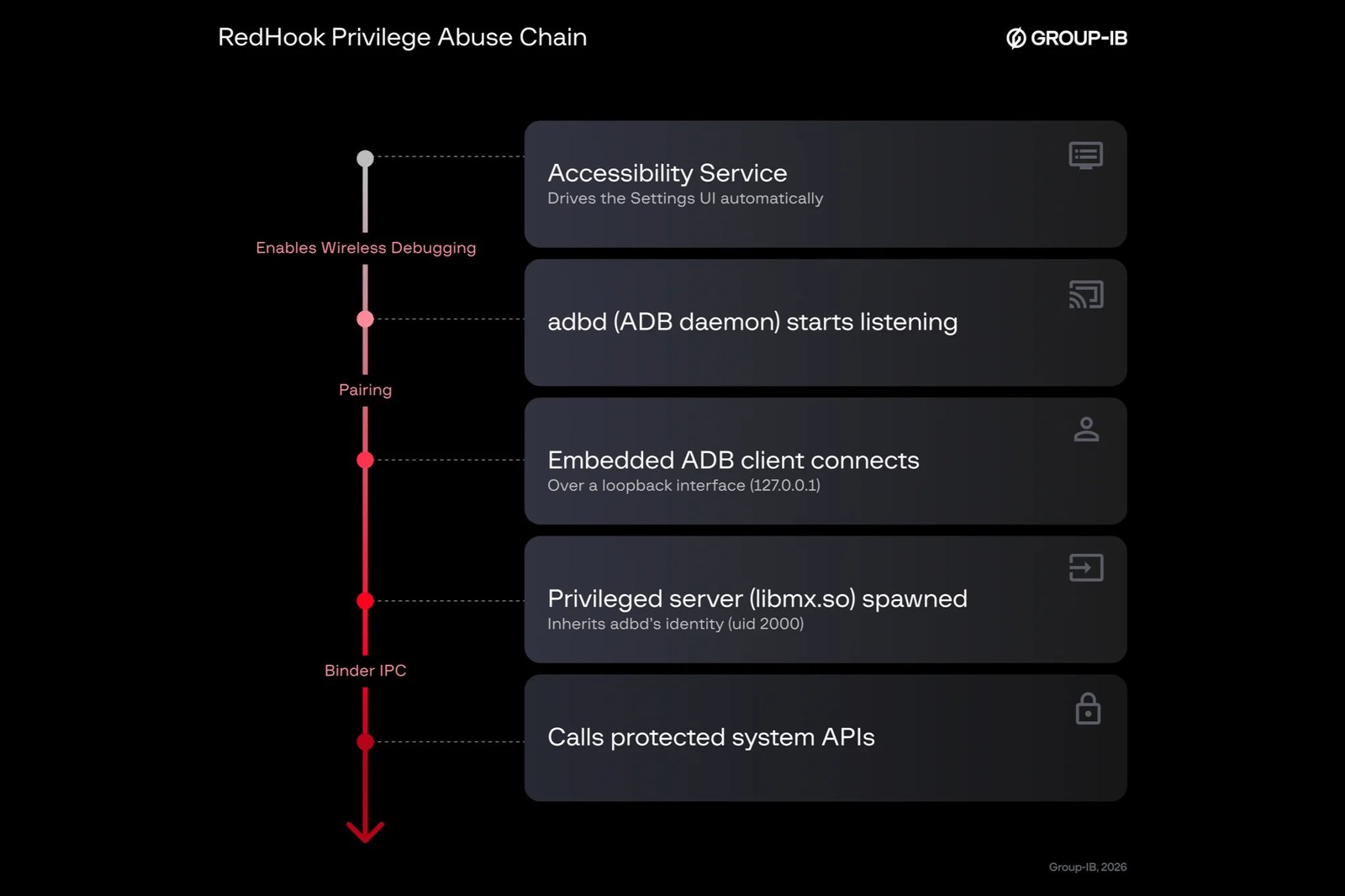
Importantly, this malware does not exploit a particular vulnerability; instead, it cleverly utilizes an open debugging interface to acquire shell-level permissions.
Source: Group-IB, "RedHook Returns with a Dangerous Upgrade" report, July 9, 2026
Why This Threat Matters
Unlike Android, iOS devices are not vulnerable to this particular malware, as Apple does not permit apps to access debugging tools like wireless ADB. However, this does not imply that iPhone users are completely shielded from scams or malicious activities.
In response to this emerging threat, Google is developing a fix which includes an Advanced Protection Mode that may eventually restrict access to Developer options for users who opt-in, though this feature is not yet available.
How to Safeguard Yourself Against RedHook
Protective Measures Against RedHook and Similar Malware
- Only download apps from Google Play or reputable official stores.
- Refrain from granting Accessibility permissions to apps without a clear need.
- Treat unexpected communications from your bank with caution and verify their authenticity.
- Regularly check your Developer options for unauthorized wireless debugging settings.
- Ensure Google Play Protect is activated for an added layer of security.
Recognizing and Preventing Patterns
The recurring solution from Google emphasizes the urgent need to limit Accessibility permissions to mitigate the chances of malware exploiting this access. A swift release of the proposed lockdown on Developer options is essential, as the current scenario requires users to remain vigilant to identify and respond to threats promptly.
Stay ahead of the curve with these additional steps:
- Monitor ongoing news about new Android malware threats we are tracking.
- Be aware of potential complications arising from Samsung's Advanced Protection feature that impacts Galaxy S26 users.
- For continuous updates and insights, follow me, @jojothetechie on X and Threads.