In an increasingly globalized world, communication across languages has become essential. Google Translate has long been a valuable tool for breaking down language barriers, whether for travelers exploring new cultures or professionals dealing with international documents. With over 1 billion active users, the app continues to evolve, introducing features that enhance its usability. The latest update introduces a Pinned Languages function, enabling quicker access to frequently used languages, making everyday interactions even smoother for users.
Google Translate's Upcoming Feature for Easier Language Switching
The latest version, 10.8.48.878519627.2, of the Google Translate app is set to unveil a new feature that allows users to 'pin' their commonly used languages right on the language selection page. This exciting addition means that users can easily warp through their top 10 languages without having to scroll through extensive lists, saving precious time and effort in urgent situations.
The app already has a "Recent languages" feature displaying the last nine languages a user has interacted with. However, with the new “Pinned languages” feature, users can now permanently display their selected languages at the top of their screen. If a user wants to pin another language beyond the ten slots available, they can simply remove one by following intuitive steps in the app.
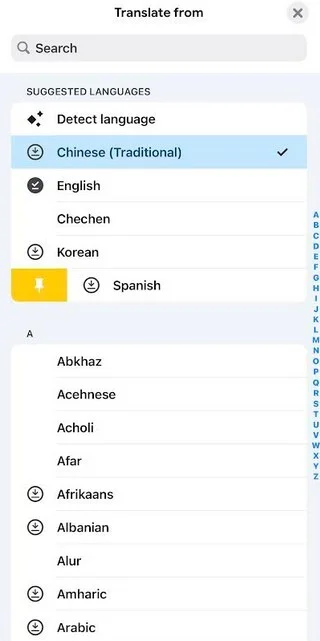
While this feature may not revolutionize language translation, it significantly streamlines the experience for users who frequently switch between multiple languages, especially in multilingual environments. For travelers, it provides a swift means to navigate language changes on the go, improving real-time communication efficiency.
How to Utilize the Pinned Languages Feature
Getting started with the Pinned Languages feature is straightforward. Users should open the Google Translate app and select the button indicating the language they are translating from. Under "Recent languages," users can swipe right on a selected language, which reveals a pin icon. Tapping on the pin icon will fix that language in their Pinned list. To unpin a language, follow similar steps—the interface will provide an unpin icon next to languages already pinned.
Explore More Tech Features
In addition to this update, check out comparisons of the latest smartphones like the Samsung Galaxy S26 Ultra and iPhone 17 Pro Max. Click here for details.
To download the Google Translate app, Android users can tap this link, while iPhone users can tap here. Notably, while the feature hasn't arrived on my Pixel 6 Pro running Android 17 Beta 2, I can confirm it functions on my iPhone 15 Pro Max using iOS 26.4 Beta 3.


