Google Enhances Pixel Launcher with New App Search Feature
Google has rolled out an exciting app search tool for Pixel Launcher users, significantly enhancing the way they navigate their smartphones. This feature, initially tested last September, is designed to streamline app accessibility, making it easier for users to locate and open applications directly from the search bar at the top of the Pixel Launcher.
Introducing the App Search Functionality
To utilize the app search feature, simply start typing the name of the desired app in the search bar. If the app is installed on your device, its icon will appear below, along with the word "open" displayed in the search bar. Once you see the "open" prompt, the magnifying glass icon on the Gboard keyboard will change to an enter key/arrow. Pressing this key will immediately launch the app.
Benefits of the New Feature
This new functionality not only allows for faster app searches but also eliminates the need for users to stretch their fingers to navigate their home screens. This feature was available on Pixel devices before the arrival of Android 13 QPR1 in December 2022, which made changes to the Pixel Launcher search functionality.
Currently, the app search feature is accessible on Pixel devices running Android 16 QPR Beta 3 and is expected to be available on other models with the stable Android 16 QPR2 version.
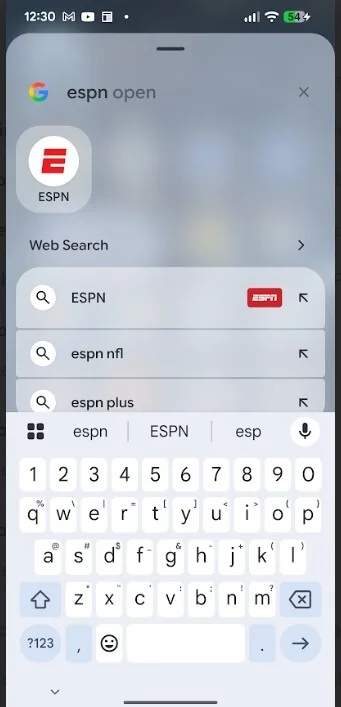
The Pixel Launcher app search feature is now available on Pixel 6 and later models. | Image credit: PhoneArena
Updates in the User Experience
In conjunction with these updates, Google also revamped the home screen search bar in November 2025. While this update shifted focus to web and AI search, users noted that it removed the ability to search within their devices for contacts and apps. However, with AI Mode now integrated, users can receive comprehensive responses backed by detailed research instead of simple links.
Exploring Google's AI Mode
The recent enhancements also brought AI Mode to the forefront. With AI Mode, when you pose a question, instead of providing standalone links, the AI collects information, reads through documents, and generates tailored reports, ensuring a richer user experience. For instance, asking for guitar recommendations for a power pop band results in a detailed analysis of potential guitars, complete with introductions to specific models.
Final Thoughts on the Update
The recent updates to Pixel Launcher and the overall search experience are significant improvements for users. They not only facilitate quicker access to apps but also enrich users with detailed insights regarding their queries. While individual preferences may vary, many Pixel users will surely appreciate these new capabilities.



