Ever wanted to read a WhatsApp message without the sender knowing? On Android, that's surprisingly hard to pull off — but relief may finally be on the way.
WhatsApp already gives users the option to disable read receipts completely, but many people prefer to keep them enabled for everyday conversations. The problem is that once those blue ticks are on, Android offers no built-in way to quietly check what someone has sent you. Notifications can help in a pinch, but they're useless if you've already dismissed them or if messages are flooding in too fast to keep track of. iPhone users have enjoyed a clever workaround for years, and now it appears Android users are next in line.
For those unfamiliar, iOS lets you long-press any conversation in the chat list to pop open a window showing the most recent messages — all without triggering the dreaded blue ticks. The catch is that this preview window is fixed in place, meaning lengthy messages or a big backlog can't be fully viewed. On Android, by contrast, long-pressing a chat simply selects it and brings up the standard top bar with options to pin, archive, mute, or delete.
That's about to change. A teardown of WhatsApp for Android beta version 2.26.44.12 has uncovered code pointing to chat previews that work just like their iOS counterpart. Once live, long-pressing a conversation will display a floating card containing the thread's latest messages, along with a redesigned context menu sitting below it.
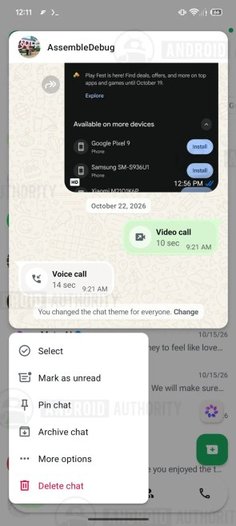
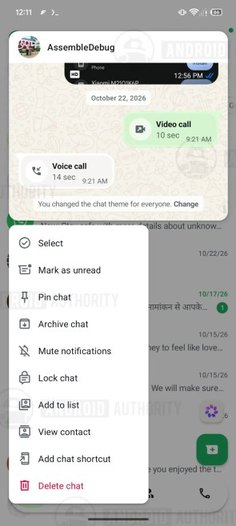 WhatsApp's chat previews on Android
Best of all, previewing a chat this way keeps read receipts at bay. And here's where Android may actually one-up iOS: the preview window supports scrolling, so you can swipe back through older messages too — still without notifying the other person that you've seen any of them.
Keep in mind the feature remains under active development and hasn't rolled out even to public beta testers. As with any feature discovered through an app teardown, there's no confirmed launch date, and there's always a chance it never ships at all. Still, here's hoping it does — it would finally bring the Android app up to par with its iOS sibling, at least on this front.