In a significant update to Android 17, Google has taken user feedback into account and introduced a feature aimed at improving the mobile data experience for users. This latest enhancement comes in the form of a simple checkbox that allows users to bypass the repetitive mobile data warning that has frustrated many. As part of the Android 17 QPR1 Beta, Pixel 10 Pro beta testers can now enjoy this convenience, with the feature expected to roll out to all eligible Pixel devices in the September Feature Drop.
Introducing the "Don't Ask Me Again" Option
In response to user feedback regarding the mobile data toggle in Android 17, Google has added an option to eliminate the warning that appears each time users enable mobile data. This feature is currently available in the latest Android 17 QPR Beta.
Mishaal Rahman, from Google’s Android community engagement team, shared this update via X on June 23, 2026.
The Backstory: Understanding the Mobile Data Warning
Android 17 has separated mobile data and Wi-Fi into independent Quick Settings toggles, a change that many users have welcomed after years of having both functionalities combined into a single Internet toggle. This modification has enabled a more streamlined experience for toggling mobile data, reflecting Google's ongoing commitment to enhancing user satisfaction.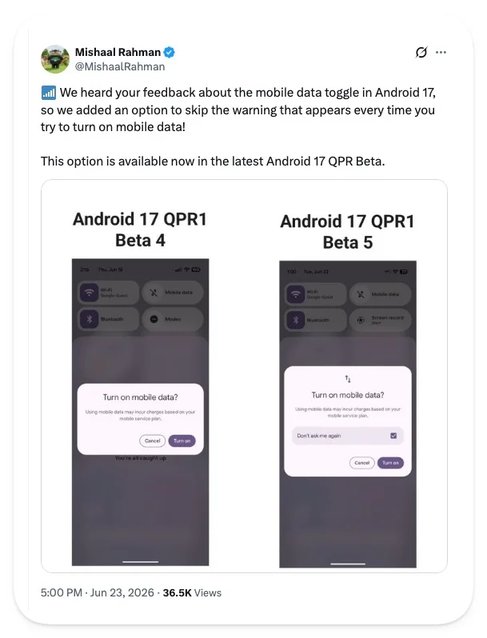
If you're using a Galaxy S26 Ultra or any device running Samsung’s One UI, this update may not affect you, as Samsung has its own method for managing these settings. Overall, this feature represents stock Android catching up with conveniences that have been available on other skins for quite some time.
Are You Experiencing This Update Yet?
Android 17 QPR1 Beta 5 is currently accessible to beta testers, with the final stable version expected to be delivered during the September Feature Drop. Users of the Pixel 6 and 6 Pro who opted out of the recent beta may find the activation of a checkbox not worth the bugs often present in beta builds.A Positive Step Forward
This minor yet significant update is a promising sign that Google is attentive to user preferences and is dedicated to enhancing the Android experience. It is hoped that this is just the beginning of a series of refinements to come.
- Our in-depth review of the Pixel 10 Pro, showcasing its strengths and features.
- Check out our review of the Galaxy S26 Ultra to see how it manages core functionalities.
- Follow me, @jojothetechie on X and Threads, for additional insights and behind-the-scenes content.