Google Messages Introduces Custom Chat Wallpapers: A Long-Awaited Feature
In a move aimed at enhancing user experience, Google Messages has begun to roll out an exciting feature that brings custom chat wallpapers to the app. This update allows users to personalize their messaging experience, setting either a cherished photo or one of the app's built-in backgrounds behind their texts. While this functionality is still in a limited beta phase, it marks a significant step, especially with the impending shutdown of Samsung Messages, which is set to redirect Galaxy S26 Ultra users towards Google Messages.
Exciting News for a Select Few
The roll-out of custom wallpapers is exclusive to a handful of users right now. A notable aspect of this feature is its personalized nature; users will see the changes only on their own devices. This means that the wallpaper you select won't be visible to the person on the other end of the conversation.
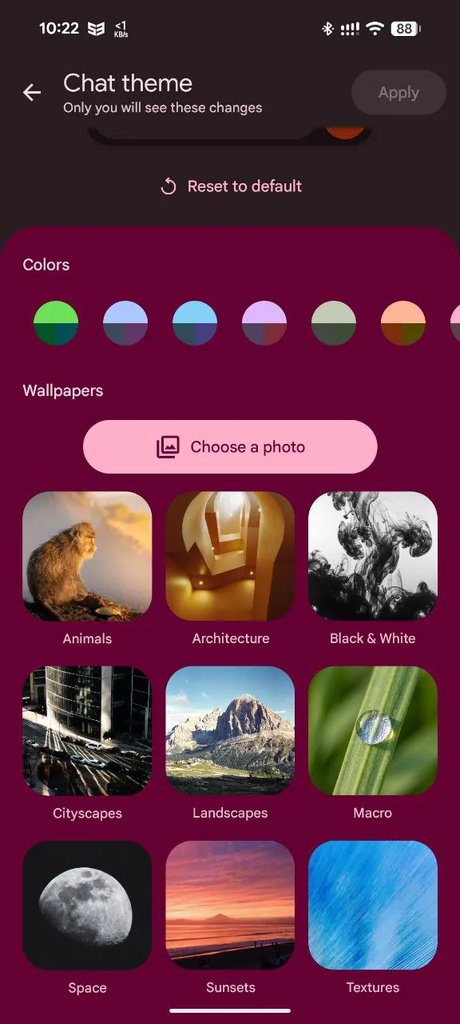
Finding the Chat Theme Feature
If you're one of the lucky users to receive this update, here’s how to access and customize your chat theme:
- Open an RCS conversation in Google Messages.
- Tap the three-dot menu in the top corner.
- Look for 'Chat theme' in the options provided.
- Select a color, pick a wallpaper or upload your own photo, and then tap 'Apply.'
Awaiting Your Turn
If you haven’t received this feature yet, don’t worry! There are plenty of topics to keep you busy while you wait. Here are some recommendations:
- The Pixel phones worth considering today
- An overview of Samsung's current lineup for those tempted to switch
- For more insights and tech discussions, follow me @jojothetechie on X and Threads.