Samsung Browser, a favorite among many Android users, is getting an updated look with the recent rollout of One UI 8.5. This update comes with a new name for the browser, previously known as the "Samsung Internet Browser." The name change is part of a broader effort to enhance the user experience for those devices that have received the update.
A Fresh Look for the Toolbar
The most notable change in this update is the introduction of a new blur effect for the browser's toolbar. This feature, spotted by Android Authority, enhances the visual appeal by adding a blurred background behind the toolbar icons, including navigation arrows, home, bookmarks, tabs, and the menu icon.
The change may seem minor, but visual enhancements like these can significantly improve the user experience. Images shared by Android Authority clearly illustrate how the blurred background elevates the overall aesthetics of the toolbar.
Pop-Up Menu: A Hub for Features
The pop-up menu within the Samsung Browser is a crucial area for users, housing essential features like Dark Mode, ad blockers, and the ability to switch between mobile and desktop versions of websites. These functionalities make browsing more efficient and customizable based on user preferences.
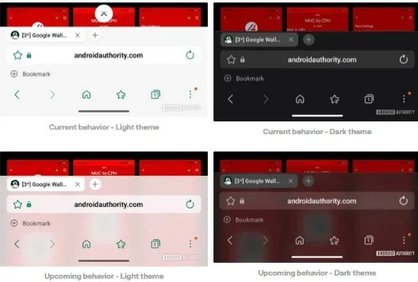
Check out the improved toolbar design with a background blur! | Image by Android Authority
The blur effect is part of the code found in version 30.0.2.30 of the Samsung Browser, while many users, like those on the Pixel 6 Pro, may still be on an earlier version. The bookmark bar’s position can also be easily changed; moving it to the bottom of the screen enhances the visibility of the blur effect.
Installing the Samsung Browser
If you're interested in trying out the Samsung Browser, checking the installed version is straightforward. Navigate to Settings > Apps > See all apps, find Samsung Browser, and view the app details to see your current version.
The Samsung Browser is pre-installed on Galaxy devices, but users with other Android devices like Google Pixel can download it from the Play Store, where it retains the "Samsung Internet Browser" name. Alternatively, you can find the app in the Galaxy Store, labeled simply as Samsung Browser.
AI Enhancements in Samsung Browser
Over the past year, the Samsung Browser has integrated several AI features, including Intelligent Summarization that provides concise summaries of lengthy articles. The browser now also boasts improved translation capabilities spanning over 20 languages, along with accent colors that sync with your device’s wallpaper and theme for a cohesive look.
A standout feature allows users to set a default website to open when launching the browser. Additionally, Samsung Browser supports "Picture-in-Picture" mode, enabling users to continue watching videos while accessing other apps—something that may not function with certain other browsers like Chrome on platforms such as YouTube.
For enthusiasts eager to explore new developments, Samsung offers a Beta version of the Samsung Internet Browser, allowing users to test features that are still in the works. It is available on both the Play Store and the Galaxy Store.