A New Look for Google Photos on Android: The Floating Bar Feature Arrives
Google Photos for Android has undergone a noticeable redesign, bringing it in line with the user-friendly updates already available on iOS. This change, although subtle, significantly enhances usability by introducing a floating bottom bar that provides easy access to key features without obstructing the user's view. Read on to discover what this new design entails and how it can enhance your photo management experience.
What's New in the Google Photos Floating Bar?
The redesigned bottom bar in Google Photos for Android is now a floating pill, elegantly separated from the bottom edge of the screen. This allows users to view content directly above the bar without obstruction. The floating bar is equipped with tabs for Photos, Collections, and Create, along with a circular icon for Gemini's AI-powered Ask Photos feature. This innovative tool enables users to search their photo library using natural language, allowing for quick retrieval of specific images based on descriptions or themes. For instance, you can easily ask for all photos from a specific trip, like your adventures at Disney World.
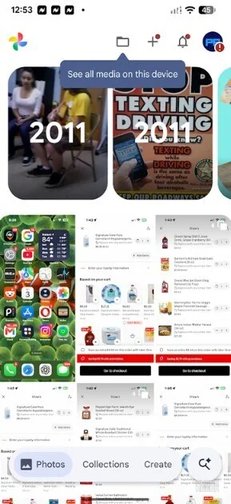
As you scroll through the Photos tab, you'll also notice another floating pill that appears at the top of the screen, providing the date of the photos currently being displayed. This enhancement gives users clear contextual information at a glance.
Similar Features in Other Google Apps
This floating bar design is also present in apps like Google Finance and Google Chat. For those who prefer the classic look, Google Photos allows you to toggle the “Show dates in grid” option from the three-dot menu in the top right corner, displaying the capture dates right in the grid sections.
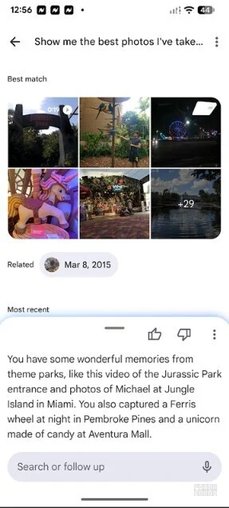
Interestingly, this floating bottom bar has been a feature on the iOS version of Google Photos since February, giving iPhone users a significant head start—around five months—over their Android counterparts. Many users have pointed out that Google often prioritizes iOS enhancements, leading to a perception that its apps function better on Apple devices.
Updating Google Photos on Android
To access this new feature, ensure your Google Photos app is updated to version 7.82. To check your current version, navigate to Settings > Apps > See all apps. From there, select Google Photos, and you can view the app's build number at the bottom of the App info page. If you're running version 7.82 and still don’t see the floating bar, try force-stopping the app and reopening it later.
Utilizing AI for Enhanced Photo Experiences
As a user who has experienced the new floating bottom bar on both the Google Photos app on my Pixel 6 Pro and my iPhone 15 Pro Max, I encourage those who haven’t yet tried Google Photos to explore it further. For Android users who need to install the app, a direct link to the Google Play Store is available. iPhone users can click for the App Store version.
Additionally, the Create tab in the floating bottom bar allows users to harness AI to transform their photos into captivating videos, create highlight reels, turn themselves into collectible figurines, and even convert images into pen sketches.


