Introduction
Google is stepping up its game by testing a new Photo Shuffle feature for Pixel smartphones, designed to mimic the popular functionality available to iPhone users. This enhancement aims to allow Pixel users to enjoy a dynamic wallpaper experience similar to the iOS setting, which showcases favorite images of loved ones and pets.
New Photo Shuffle Feature Coming to Pixel Smartphones
Exciting news for Pixel users: Google is reportedly testing a new Photo Shuffle feature that could soon be available on Pixel smartphones. Similar to the iOS Photo Shuffle, this feature allows users to create personalized albums filled with images of their favorite people and pets, which can then serve as dynamic wallpapers on their devices. Users can enjoy the beauty of their chosen images rotating as wallpapers, either every hour, daily, at sunrise and sunset, or whenever they tap the screen.
Android 17 QPR1 Beta 5 Hints at Photo Shuffle
Reports suggest that clues uncovered in the recent Android 17 QPR1 beta 5 update indicate Google is indeed actively testing this feature for Pixel devices. Users will have the flexibility to select images from already compiled albums or create new ones tailor-made to their preferences. For some time, Pixel users have resorted to third-party applications, often battery-draining, to achieve a similar effect, but this new native option is set to change that.
Current Wallpaper Change Options for Pixel Users
At present, Pixel users can set their wallpapers to change automatically on a daily basis, but with limited controls over photo selection and shuffle timing. To use the current version of the wallpaper shuffle, Pixel owners need to navigate to Settings > Wallpaper & style > More wallpapers, where they can select from Collections.

Pixel users will be able to determine how often the wallpaper changes on their phone. | Image by Android Authority
After selecting the Collection images, users will click on an icon in the top right corner to enable automatic changes to their wallpaper. A pop-up will then give the option to select whether future images should be downloaded only when on a Wi-Fi connection.
Apple's Photo Shuffle Feature
For those interested in how Apple's feature works, iPhone users can set up wallpaper shuffling by navigating to Settings > Wallpaper > Add New Wallpaper and selecting the photo shuffle option. They can choose images from various categories, including Pets, Nature, Cities, or custom Albums, and shuffle them on different triggers, such as hourly or daily.
As an advocate for the Android user interface, I must admit that Apple’s implementation of this feature is both simple and effective. If Google aims to replicate this feature, let’s hope they maintain a similarly straightforward setup for Pixel users.
Personalizing Your Wallpaper Experience
Personally, I have never utilized this feature across my smartphones, including my current Pixel 6 Pro and iPhone 15 Pro Max. However, I might give it a try on my Pixel, where I usually prefer cityscapes as my wallpaper.
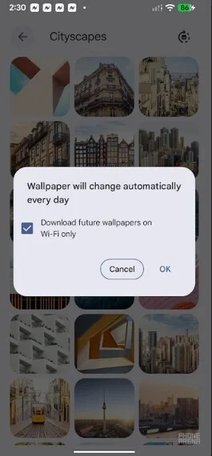
Pixel users can currently have the wallpaper changed daily using a Collection of images. | Image by PhoneArena
Choosing Your Phone's Wallpaper: A Personal Touch
The wallpaper on your phone is not just an aesthetic choice; it often reveals something personal about you, especially if it features images you have captured yourself. Even stock images supplied by the manufacturer can be viewed through the lens of personal significance.
Interestingly, the first iPhone's wallpaper depicted Earth from space, known as "Blue Marble," which was a composite image created from data collected by NASA over several months.