With the rollout of Android 17 for Tensor-powered Pixel devices, users are being introduced to some exciting features that enhance their mobile experience. While many are already aware of the new tools like App Bubbles for multitasking and Screen Reactions for creative screen recording, a noteworthy improvement in audio quality has quietly made its way into this update. This article uncovers the lesser-known enhancements, specifically the introduction of the LHDCv5 codec, which brings high-resolution wireless audio capabilities to compatible Pixel devices.
Unveiling New Features in Android 17
Android 17 has delivered some impressive features that benefit users of the Pixel 6 and later models along with the Pixel Tablet. Significant additions to the operating system include the user-friendly App Bubbles, which streamlines multitasking, and the innovative Screen Reactions feature, which simulates a virtual green screen while recording your screen. However, there’s more beneath the surface that audio enthusiasts will certainly appreciate.
Experience High-Resolution Wireless Audio
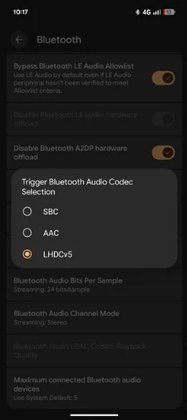
A major upgrade for Pixel users is the integration of the LHDCv5 codec. This enhancement allows for Hi-Res Wireless audio streaming at a maximum bitrate of up to 1 Mbps, far surpassing the standard definitions provided by older codecs like AAC (256 kbps) and SBC (328 kbps).
Audiophiles Rejoice: Why the LHDCv5 Codec Matters
For casual users listening to music or watching videos, the difference may not be immediately noticeable. However, for audiophiles or those who enjoy high-fidelity sound, the LHDCv5 codec transmits three times the data of AAC or SBC. This feature allows listeners to experience finer details in their favorite tracks, particularly in genres like classical music. Moreover, the lower latency provided by this codec improves the synchronization between audio and video, making it beneficial for gaming or watching films on your Pixel device.
Previously Restricted High-Bitrate Audio Options
Before Android 17, Pixel users could only access high-bitrate audio by utilizing headphones or earbuds that supported the LDAC codec. So, if your audio accessories didn’t support LDAC, you were stuck with standard definitions provided by AAC or SBC. This change marks a significant improvement, making high-quality audio accessible to a broader range of users.
Activating the LHDCv5 Codec on Your Pixel
Despite this exciting update, Google has opted for a discreet introduction of the LHDCv5 codec, requiring users to enable it through Developer Options. Follow these simple steps to activate the codec:
- Open your device's Settings.
- Scroll down and tap on System.
- Navigate to Developer Options.
- Tap on Bluetooth Audio Codec.
- Select LHDCv5.
If you haven’t already enabled Developer Options, begin by going to Settings > About phone and tapping on the Build Number seven times to unlock this feature.