Pixel Users Face Connectivity Issues with 5G After Android 17 Update
Recently, Google rolled out Android 17, aiming to enhance the experience for users with Pixel devices ranging from the Pixel 6 series to the Pixel 10 lineup, as well as the Pixel Fold and Pixel Tablet. However, shortly after the update, many users found themselves facing unexpected problems. While some were unable to access Google apps when connected to Wi-Fi, a new issue has arisen, notably affecting 5G connectivity. Let's delve into the specifics of this notable bug and how users can potentially troubleshoot the issue.
Following the release of Android 17, a number of Pixel device owners reported a troubling problem: their phones would not maintain a stable 5G connection, often being reverted to a slower 4G connection instead.
5G Connectivity Problems for Pixel Users
On platforms like Reddit, users have shared their experiences. For instance, one user, "BackpackBuddha," noted that prior to updating his Pixel 9 Pro to Android 17, his 5G signal was reliable. Post-update, he found his device solely connected to an LTE signal.
Others echoed similar sentiments, reporting that their devices struggled to connect to 5G networks despite prior functionality. In light of this widespread issue, some users reported a potential DIY fix that might resolve the connectivity trouble.
DIY Fix for the 5G Connectivity Issue
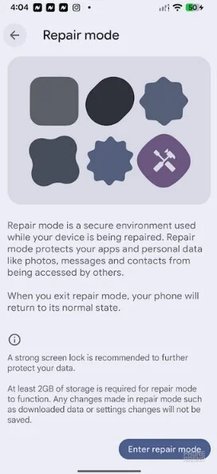
One user, "livingitdaybyday," shared a simple workaround: after experiencing connectivity issues with his Pixel 10 Pro following the update, he accessed Settings > System > Repair mode > Enter repair mode > Restart. Simply exiting Repair mode resolved his 5G connectivity problems, allowing him to restore a stable connection.
Repair mode provides a secure environment that safeguards apps and personal data during repairs, ensuring that your contacts, messages, and photos remain protected. To utilize this mode, a minimum of 2GB of storage is recommended.
Many users have reported success with this solution, indicating it may be an effective approach for those unable to maintain a 5G signal after updating to Android 17.
Additional Bugs and Future Updates
Despite the potential fix, other concerns have emerged. Some users have noted that home screen widgets have vanished post-update, although this appears to be tied to devices with configured work profiles. Google is aware of this issue and plans to address it in forthcoming updates.
New Features in Android 17
Not all news surrounding Android 17 is negative. The update introduces exciting features like App Bubbles, turning applications into floating bubbles for easy multitasking, and Screen Reactions, allowing simultaneous recording of your screen and use of the front-facing camera, effectively creating a virtual green screen effect.
How to Enable Screen Reactions
To enable Screen Reactions, swipe down from the top of your screen to access Quick Settings. Tap on the Screen record button, select "Entire screen," and enable "Show selfie camera" along with "Record microphone" options. A variety of configurations are available to tailor this feature to your needs.
For users looking to install Android 17 on their Pixel devices, navigate to Settings > System > Software updates > System update and follow the on-screen instructions.