If you find your Android phone lagging or its battery draining faster than usual, there's a hidden tool that can help you optimize its performance. Android devices come equipped with a powerful RAM management feature that lets you track app memory usage and identify resource-hungry applications. This can lead to smoother performance and extended battery life, especially for those with a plethora of apps installed.
The Evolution of RAM in Android Devices
Since 2009, Android phones have witnessed a remarkable increase in RAM capacity. For instance, the original Motorola DROID came with a mere 256 MB of RAM, while many modern devices boast up to 12 GB. This astronomical increase in memory allows for significantly improved multitasking and app performance.
However, having a large number of applications—like the 334 on my Pixel 6 Pro—can pose challenges. Many apps run in the background, consuming RAM and causing significant performance issues. This excessive resource usage can slow down your phone and drain its battery more quickly.
Discover the RAM-Hogging Apps
A hidden tool within Android helps you pinpoint which apps are consuming the most memory. By identifying and removing these problematic applications, you can potentially restore your device's original speed and efficiency. Slower performance often leads to battery drain, as the device exerts more energy to manage the overloaded RAM.
To begin using this tool, you'll first need to enable Developer Options. If you haven't done this yet, navigate to Settings > About phone and tap on the Build number seven times.
Accessing Developer Options
Once you've enabled Developer Options, you'll gain access to numerous settings meant for developers. Look for the option to enable memory usage profiling and allow your phone to reboot.
After rebooting, navigate back to Developer Options, select “Memory used by apps,” and view the memory consumption of your applications over the past three hours. This default setting can be adjusted to show usage over 12 hours or 1 day for deeper insights.
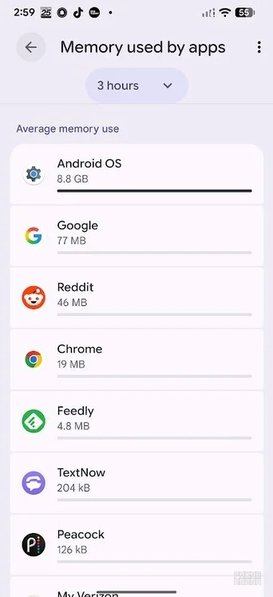
My Pixel 6 Pro's memory usage over the past three hours.| Image by PhoneArena
For instance, while Android itself averaged 8.8 GB of RAM usage over this period, it was clear that some applications, such as Google and Reddit, consumed far less. However, the noticeable RAM hogs are those apps you rarely use—as they can significantly impact your device's performance and battery life.
Identifying Unused Memory-Hungry Apps
By switching to the 12-hour or 1-day tracking options, you can better analyze which apps occupy excessive memory. Consider removing applications that take up substantial amounts of RAM but are infrequently used. For example, I discovered that the Mi Fitness app, which I no longer use, had taken up 51 MB of memory, leading me to delete it.
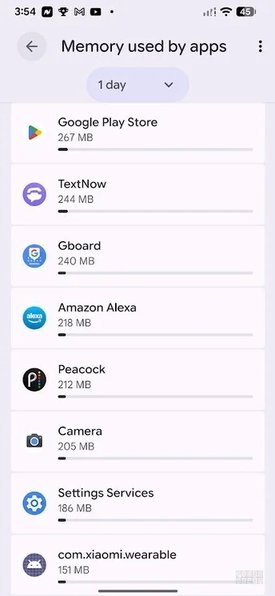
One day's worth of app memory usage results.| Image by PhoneArena
Moreover, by sorting apps by maximum usage rather than average, you might uncover surprising data. For example, I learned that the TextNow app—an app I seldom open—had surged to as high as 244 MB of memory use in a single day.
In conclusion, if you're using an older Android phone, utilizing tools like this can significantly enhance your device's performance and prolong battery life, making it feel fresh and responsive again.