Exciting New Updates for Google Messages: Real-Time Location Sharing and Mentions Feature
Google Messages continually evolves to enhance user experience, and today marks the introduction of two significant features that aim to improve communication. These new updates come on the heels of previous enhancements, further enriching the app's functionality. In this article, we delve into these latest features and how they can enhance your messaging experience.
Enhancements in Google Messages
Google Messages has recently integrated real-time location sharing, a feature that allows users to share their live location as they move. Previously, users could only share a static address, which did not update even as their position changed. The new dynamic feature ensures that the location reflects users' movements in real-time, providing a more accurate means of sharing one's whereabouts.
A Look at Recent Changes
In earlier updates, Google Messages redesigned the read receipt icons from the traditional "Double Bubble" look to a single circle displaying one of four states. Additionally, the newly introduced "Tap to Draft" feature allows users to modify Smart Replies before sending them. This functionality enhances the Smart Reply feature, which provides AI-generated responses based on the context of incoming messages, promoting a more personalized communication style.
Introducing Mentions for RCS Chats
Another noteworthy addition to the Google Messages app is the "Mentions" feature, which empowers users to grab the attention of specific individuals in RCS group chats. By using the @ symbol, users can notify the mentioned contacts, ensuring they receive alerts even if the conversation is muted. This feature is designed to boost engagement and ensure that important messages are seen by the right people.
Modified Deletion Process with "Move to Trash"
Alongside these exciting updates, Google Messages has replaced the immediate deletion function with a new "Move to Trash" feature. Now, when users opt to delete conversations, they will first be moved to a Trash folder, where they will remain for 30 days before being permanently removed. On Android Go devices, messages in the Trash are only retained for seven days. Users can access the Trash by tapping their profile icon in the app and selecting the "Trash" option.
How to Update Your Google Messages App
To enjoy these new features, ensure your Google Messages app is updated to version 20260320 or higher. Users can check their current version by navigating to Settings > Apps > See all apps > Google Messages. If an update is needed, visit the Play Store, select your profile icon, and update your apps.
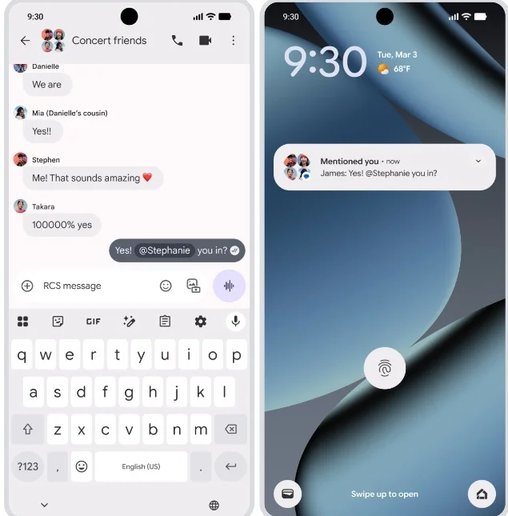
You can now utilize the @ mention feature in your RCS chats! | Image by 9to5Google