Google's Pixel Phones Introduce Enhanced Bluetooth Diagnostics Tool
Pixel phone users have reason to celebrate with the introduction of a new Bluetooth diagnostics tool. This feature, which comes with the latest update to the Pixel Troubleshooting app, simplifies the process of identifying and resolving Bluetooth connectivity issues. In this article, we dive into how you can access this feature and the variety of diagnostic tools available to improve your overall device experience.
Currently, I have tested this feature on my Pixel 6 Pro running Android 17 Beta 3. The Bluetooth diagnostics tool joins a suite of five diagnostic tools available on Pixel phones:
- Touch diagnostics
- Battery diagnostics
- Device temperature
- Troubleshoot mobile connection
- Bluetooth diagnostics
Diagnosing Bluetooth Issues Made Easy
If you're encountering problems with Bluetooth connectivity between your phone and associated devices—ranging from smartwatches to earbuds and car infotainment systems—the Bluetooth diagnostics tool is here to help. It automatically recognizes Pixel-specific accessories, like the Pixel Watch and Pixel Buds, while also allowing options for other brands under the "Other" category.
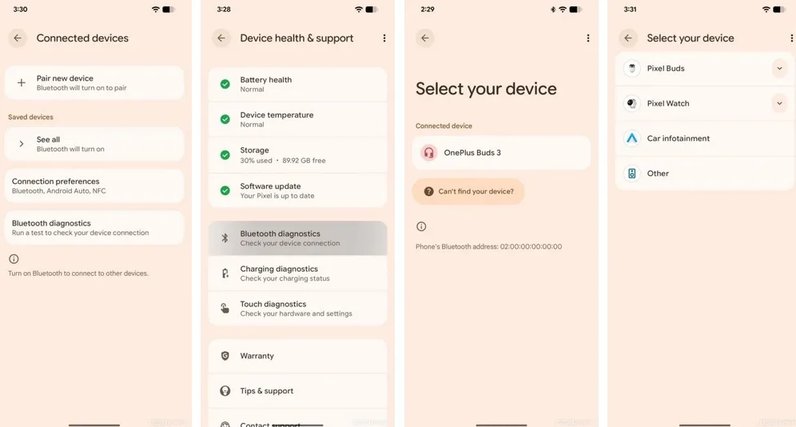
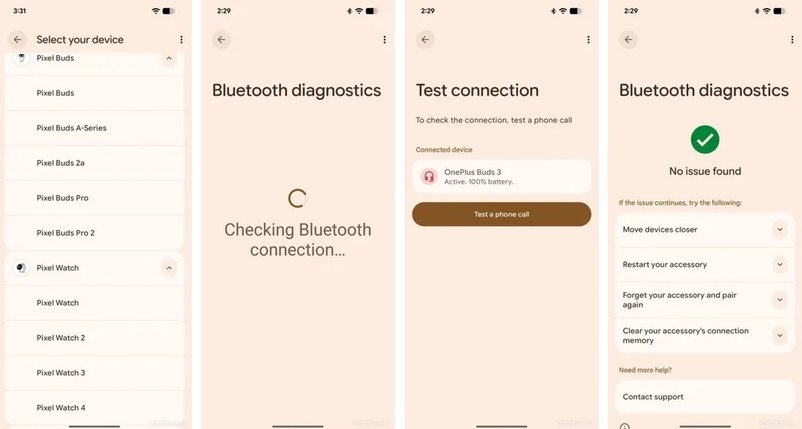
While the app is in use, you can make a phone call, which allows the diagnostic test to evaluate potential Bluetooth issues. This feature is accessible across all Pixel models, eliminating the need for third-party apps to troubleshoot connectivity problems. After running its diagnostics, the tool provides feedback and suggests solutions to enhance your Bluetooth connection.
Common recommendations for improving Bluetooth connectivity include:
- Bringing the Bluetooth accessory closer to the phone.
- Restarting the Bluetooth accessory.
- "Forgetting" and re-pairing the accessory's Bluetooth connection.
- Clearing the connection memory of the Bluetooth accessory.
Similar Features on Other Devices
Other smartphone brands also offer Bluetooth diagnostics tools. For instance, users of the Samsung Galaxy S26 and S25 can conduct specific Bluetooth tests under Support > Diagnostics > Phone Diagnostics. The Samsung tool analyzes internal Bluetooth hardware and provides connection quality scores for paired Galaxy Buds, especially with the Galaxy S26 Ultra.
Apple's iPhone also has diagnostic tests available in iOS 26, although they are not as specific. Users can activate Apple Diagnostics Mode by holding both volume buttons while connecting the device to power, which runs several hardware tests, including one on Bluetooth antennas and radio capabilities.