Google is continuously innovating to enhance user experiences across its applications. Recently, a new feature is being tested within the Google Messages app that aims to improve how users interact with Smart Replies—an AI-driven feature designed to generate contextually relevant responses to incoming messages.
Streamlining Message Responses with Tap to Draft
Smart Reply leverages on-device AI to provide quick response options. For instance, if a friend asks, "Are we still on for dinner at 7 pm?" possible Smart Reply options might include "Absolutely!" or "See you there!" By tapping on these responses, users can save time while replying to messages.
Usually, when a user taps on a Smart Reply, it’s instantly sent as a new message—a process referred to as "Tap to Send." However, this can lead to sending responses with mistakes or without the opportunity to personalize the reply further.
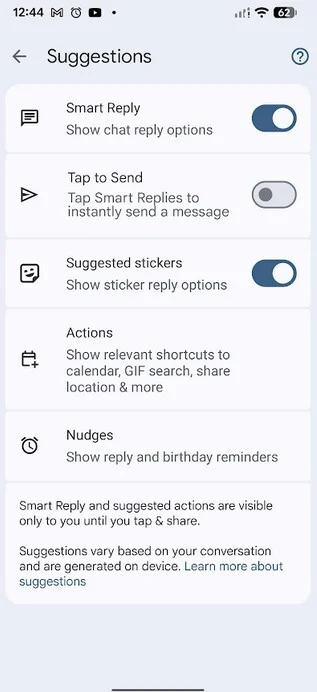
With the new beta version of Google Messages, users can modify the Tap to Send default to a new feature called Tap to Draft. This shift allows selected Smart Replies to be placed in the message field for further editing prior to sending.
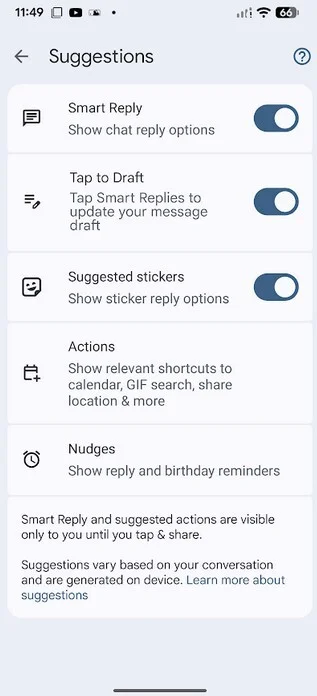
Activate the Tap to Draft setting to allow editing of Smart Replies before sending. | Image by PhoneArena
How to Enable Tap to Draft
To customize your Google Messages settings, simply open the app and tap your profile icon in the top right corner. Navigate to Messages settings > Suggestions, where you’ll find the Tap to Send option. If you'd like to have more control over your Smart Replies by allowing edits, enable the Tap to Draft toggle. Your preference will remain saved even after exiting the app.
Do you think you would find the Tap to Draft feature useful?
Google remains committed to improving user experience and functionality with the Google Messages app, and features like Tap to Draft clearly indicate that direction.