Android users of Gmail are in for a treat! Google is currently testing a new feature that will bring the ability to create, edit, and delete custom labels directly within the Gmail app for Android, aligning it with the capabilities already available to iPhone and iPad users. This new functionality will allow users to better organize their emails, creating a more personalized experience.
Explore the Custom Labels Feature in Gmail for Android
Google's testing phase includes a "Create label" option accessible through the main sidebar menu of the Gmail app. Android users will be able to tap on this option, prompting them to enter the desired name for their new custom label. iPhone users have already enjoyed this feature, and now Android users will soon catch up!
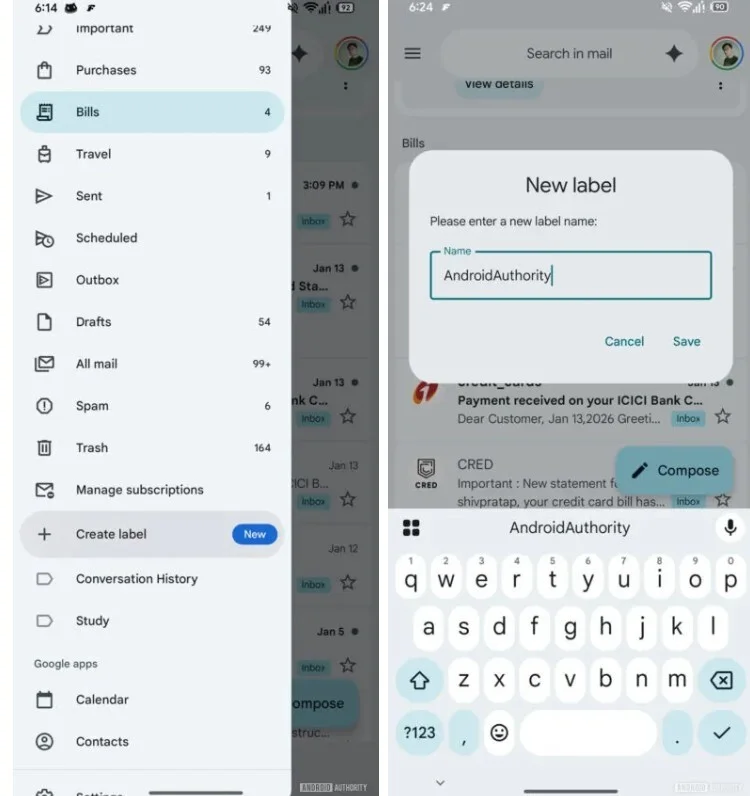
To edit or delete a custom label in the Android version, users can once again tap the hamburger menu, select Settings > Inbox > Manage labels. This will enable them to rename their existing custom labels. For iOS users, the process is slightly different; they navigate to Settings > Inbox customizations > Labels, choose a label to edit, and follow prompts to make changes.
Manage Your Custom Labels Privately
Only the account owner can access custom labels. Others cannot see these labels in emails. Notably, deleting an email removes it not only from the inbox but also from any associated labels.
The Distinction Between Folders and Labels
Before getting too excited, it's important to note that while Google is testing this feature, it may not be guaranteed for release in the Gmail for Android app. Regardless of the outcome, the capability to create custom labels will continue for users on iOS and the desktop version of Gmail.
Your Thoughts on Custom Labels?
Labels can be more beneficial than traditional folders since they enable a more flexible organization style; an email can have multiple labels, allowing it to be categorized in various ways simultaneously. For instance, an invoice from Verizon can be labeled under "Wireless Service," "Verizon," and "Outages," creating a more tailored filing system.