Google has officially rolled out the Android 16 QPR3 Beta 1 update, marking the start of the Beta releases tied to the March Pixel Feature Drop. This initial Beta introduces several new features, including enhanced customization of the At a Glance widget, which provides users with timely information such as weather updates, active alarms and timers, commute times, earthquake alerts, flight statuses with gate changes, and even food delivery ETAs.
Significant GPU Driver Update for Pixel 10 Series
One of the standout improvements in this Beta is the new GPU driver update for the Pixel 10 series, specifically targeting Tensor G5's PowerVR GPU. Currently available only to Pixel 10 series users enrolled in the Android 16 QPR3 Beta program, this update upgrades the GPU driver to version 25.1. Early feedback from users of Pixel 10, Pixel 10 Pro, Pixel 10 Pro XL, and Pixel 10 Pro Fold models indicates noticeable performance improvements.
Since the GPU driver update is packaged alongside an Android system update, some of the enhanced performance may also stem from the system-level optimizations included in this Beta.
Additional Features in Android 16 QPR3 Beta 1
Aside from the Pixel 10 GPU driver, the update offers users running Pixel 6 and newer models increased control over flashlight brightness, the ability to customize the order of 3-button navigation buttons, and alerts notifying when apps access the camera, microphone, or location data.
Expected Improvements from the New GPU Driver
- Smoother gameplay for graphics-intensive titles like Genshin Impact, addressing past performance complaints.
- Enhanced efficiency in shader compilation, cache management, and memory handling.
- Support for Vulkan 1.4 API and broader OpenCL extensions, reducing app crashes during graphics-heavy tasks.
- Potential improvements in battery life due to a more efficient GPU during demanding operations.
Introducing Gemini: Goodbye to the “Bodyless Face” UI
With this Beta, Google has finally retired the controversial and oddly animated "bodyless face" UI that appeared when using Google Assistant on Pixel devices. Instead, Google introduces Gemini, featuring a fresh interface with a color-changing arc at the bottom of the screen showcasing Google's signature colors—red, yellow, green, and blue.
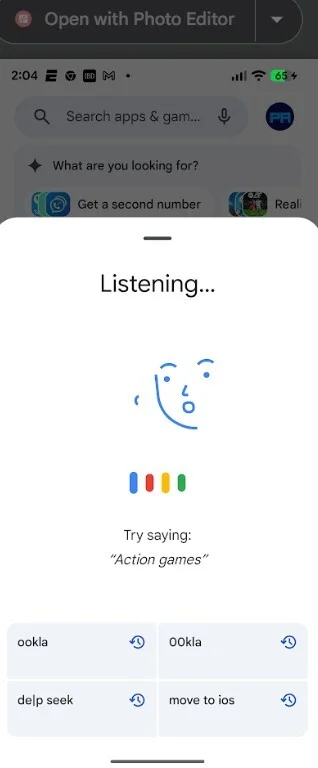
The removed bodyless face UI from Google Assistant replaced by the new Gemini interface. | Image credit: PhoneArena
How to Join the Android 16 QPR3 Beta Program
If you want to experience these enhancements early—especially the revamped UI and GPU driver improvements—Pixel 6 and later users can enroll in the Android 16 QPR3 Beta program. Prior to installing, it’s recommended to back up your device data. Then, visit the Android Beta Program by tapping here. Select your eligible device from the list and opt-in to join the Beta. After enrolling, check for system updates by going to Settings > System > Software updates > System update, and download the latest Beta build.



