If you're encountering crashes whenever you tap the search bar in the Google Play Store on your Android device, you're not alone. A widespread bug is causing the Play Store to close instantly upon engaging the search function, effectively blocking users from installing new apps.
The Search Function Is Temporarily Disabled
While clearing the cache has helped some users, many still encounter crashes despite several restarts. Early indications suggest this is a server-side problem triggered by recent Play Store updates, thus requiring Google’s intervention.
Frustration Mounts Among Android Users
This is more than a minor nuisance; it disrupts the fundamental way users access new applications on their phones. By contrast, the Apple App Store tends to maintain stability during such outages, ensuring users can still search and download apps with minimal interruption.
Recommended For You

Fortunately, there are temporary workarounds. Many users have successfully restored Play Store functionality by uninstalling the latest updates, effectively reverting to an earlier version. The problematic Play Store version appears to be 49.2.33-31.
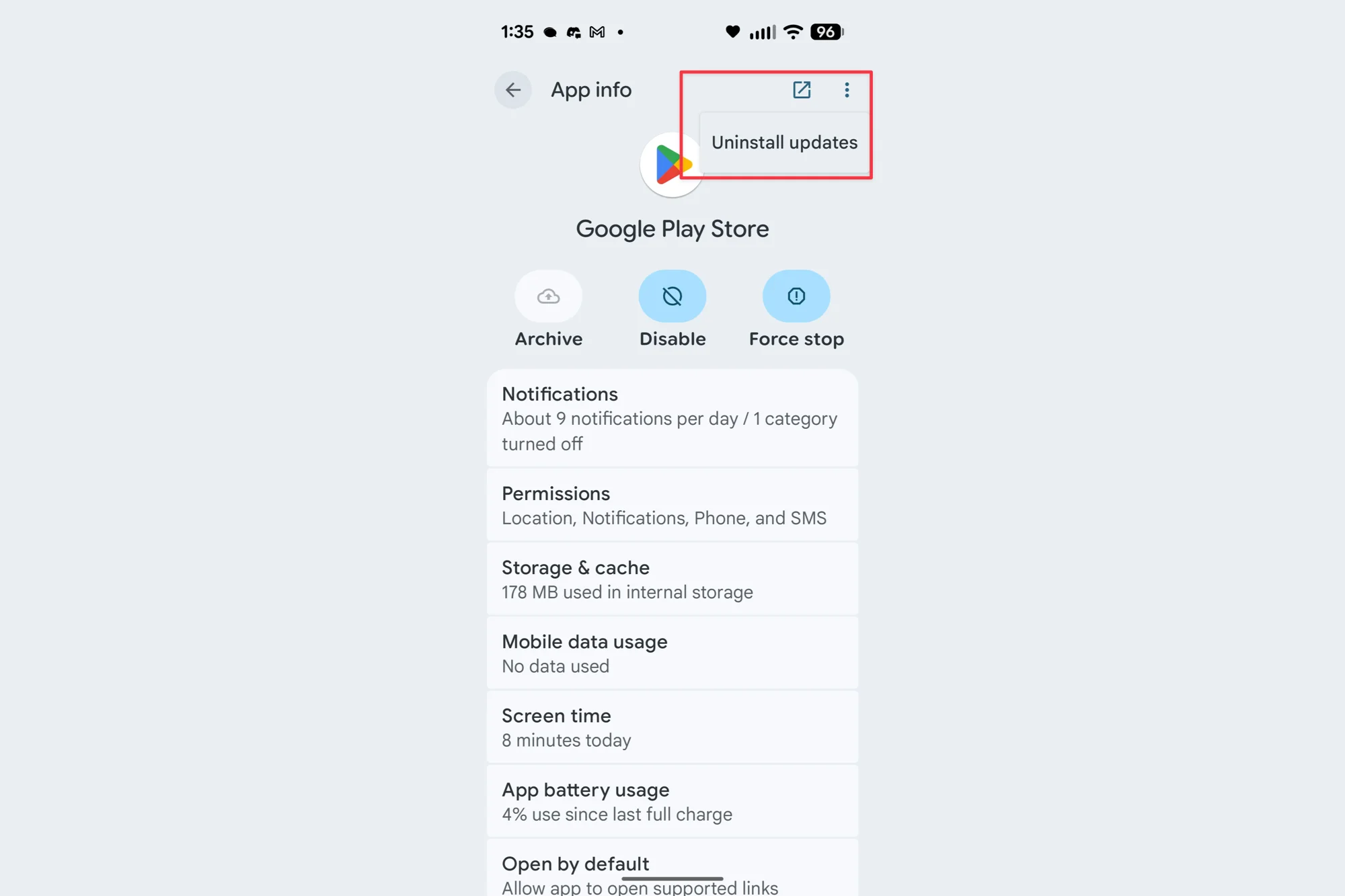
How to uninstall Google Play Store updates:
- Open your device’s Settings.
- Navigate to Apps.
- Select "See all apps" to list installed applications.
- Find and tap on Google Play Store.
- Tap the three dots in the upper right corner.
- Choose "Uninstall updates".
- Return to Play Store and try searching again.
Another partial workaround is using a web browser to search for the desired app, then tapping the link to open it directly in the Play Store. However, these solutions are temporary while users await the official fix.
Have you been impacted by this Play Store search issue?
Waiting for the official fix
While the fix is rolling out, patience is key. Meanwhile, users can subscribe to stay up-to-date with the latest Android news and developments.


