Apple and Google have collaborated to simplify the process of switching between iOS and Android devices. With the rollout of Android Canary 2512 (ZP11.251121.010) to Pixel phones and Apple's upcoming iOS 26.3 update, users will soon enjoy a new and efficient way to transfer their data across platforms.
The new "Transfer to Android" feature, introduced in iOS 26.3 Beta 1, leverages wireless technology similar to AirDrop, allowing iPhone users to move contacts, messages, photos, notes, and more to an Android phone without the need for cables.
Current Options for Switching Between iOS and Android
Until the full release of this feature, both Apple and Google offer apps to facilitate data transfer. iPhone users switching to Android can install the Android Switch app from the App Store, while Android users moving to iOS can download the Move to iOS app from the Google Play Store. These apps provide the easiest way to migrate data for now.

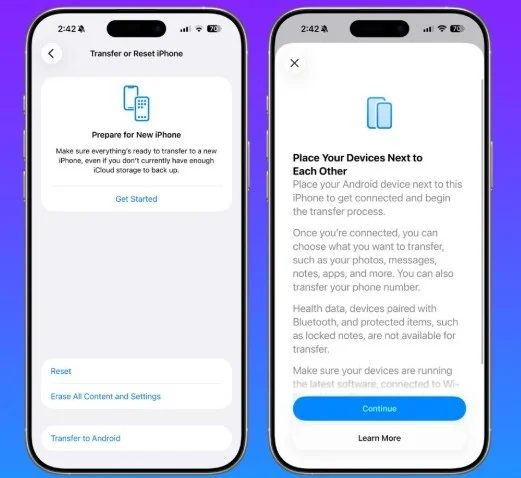
For those enrolled in Apple's Beta program, iOS 26.3 Beta 1 is available via Settings > General > Software Update. Within this update, users can find the new "Transfer to Android" option under Settings > General > Transfer or Reset iPhone. Tapping this button initiates the wireless data transfer to an Android device.
How "Transfer to Android" Works
The feature uses peer-to-peer Wi-Fi and Bluetooth connections, eliminating the need for cables or other accessories. When activated, users place their iPhone and Android device side-by-side to establish a connection. After pairing via QR code scan or session ID and code, users can select which data types—such as photos, apps, messages, and notes—to transfer. Phone numbers can also be moved, but certain protected data like locked notes, health information, and Bluetooth device pairings are excluded.
Google's Counterpart: "Transfer to iOS"
Google also supports a similar method for transferring data from Android to iOS devices. When both devices have the latest software, placing them next to one another enables the secure transfer of eligible information.
Community Poll: Would You Use "Move to Android" When Switching?
Current Results:
- Yes. It makes switching faster: 83.33%
- No. I don't trust the security of the feature: 16.67%
Total Votes: 6


