Apple has officially released iOS 26.2, bringing several exciting new features for iPhone users. If you haven't updated yet, head to Settings > General > Software Update to download and install the update. For those who participated in the iOS 26 beta program, now is a great opportunity to switch back to the stable version by installing iOS 26.2.
How to Install iOS 26.2 and Prepare for the Upcoming iOS 26.3 Beta
If you prefer avoiding beta software, you might want to skip the iOS 26.3 beta and wait for the next version, iOS 26.4, which is expected to introduce personal and AI-driven enhancements to Siri. However, if curiosity gets the best of you and you've already installed the stable iOS 26.2 release, the 26.3 beta should become available soon. To access it, navigate to Settings > General > Software Update and ensure the Beta Updates option is set to either iOS 26 Developer Beta or iOS 26 Public Beta. Choosing Developer Beta will grant you earlier access to updates.
Have you updated to iOS 26.2 yet?
New Reminder Alarm Feature in iOS 26.2
A standout addition in iOS 26.2 is the ability to link alarms with reminders. When you open the Reminders app for the first time after updating, you’ll notice a new prompt explaining this feature designed to help ensure you never miss important alerts. Apple explains, “To receive alarms for reminders marked as urgent, allow Reminders to schedule alarms. Urgent reminders will sound alarms even if your device is silenced or a Focus mode is active.”

With iOS 26.2, alarms can now alert you for reminders you create. | Image credit: PhoneArena
When creating a new reminder, under the Date & Time section, you will find a toggle labeled “Urgent.” Activate this toggle to ensure your alarm sounds at the scheduled reminder time.
Apple News App Gets Convenient Shortcuts
The Apple News app now includes handy shortcuts placed at the top of the screen, making it easier to access your preferred categories. These shortcuts are:
- Sports
- Puzzles
- Politics
- Business
Simply tap on a category to view the latest headlines tailored to that topic.
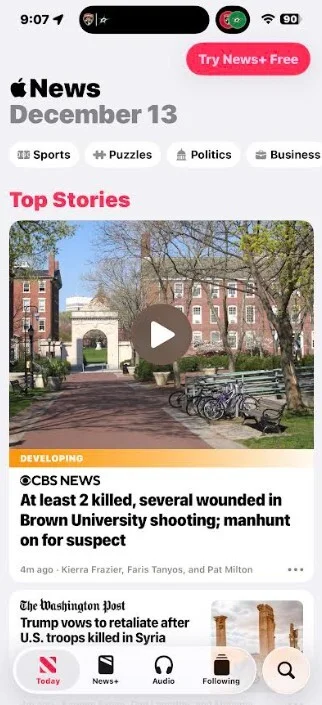
Shortcuts have been added to the Apple News app. | Image credit: PhoneArena
Enhancements to the Apple Podcast App
The Podcast app sees several improvements with this update. If an episode lacks individual chapters, the app will automatically generate them for easier navigation. Additionally, links to other podcasts mentioned during the episode will now be included. Plus, any URLs referenced in the podcast can be found directly on the episode page.
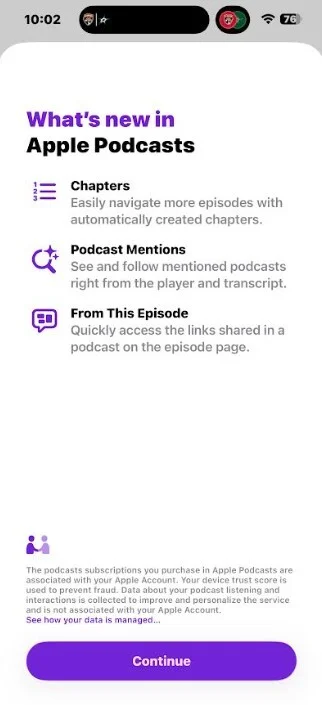
Several new features have been added to the Apple Podcast app. | Image credit: PhoneArena
Updated Sleep Score System in Health App
Apple has refined the Sleep Score system in the Health app after feedback from users who felt their high scores didn’t reflect their actual sleep quality. The top score label has been renamed from “Very High” to “Excellent,” with a higher threshold required to achieve it. Also, scores below 40 will now be categorized as “Very Low,” instead of the previous cutoff of 29.
You can find the Sleep Score feature by opening the Health app and scrolling down to it. The score is based on your sleep Duration, Bedtime consistency, and number of Interruptions, measured through an Apple Watch or any compatible device.
Customize Your Lockscreen Transparency
Another notable change is a new slider that enables you to adjust the transparency level of the “Liquid Glass” lockscreen effect. To access this, perform a long press on an empty area of your lockscreen, tap the clock at the top, and you’ll find the transparency slider near the bottom of the display.


