Many Android users have long known that while system apps cannot be fully uninstalled, it was previously possible to uninstall their updates via the Google Play Store. However, Google has recently changed this process, making the uninstall update option less accessible. At the same time, Google is rolling out new functionality to allow users to remotely install or uninstall apps directly from the Play Store on their connected Android devices.
Google Changes How You Uninstall System App Updates
If you browse through system app listings in the Play Store now, you'll notice the familiar Uninstall button has disappeared, replaced by an Open button. This affects apps pre-installed on your device, including those not appearing in the app drawer such as Android Auto and Pixel Camera Services. This change has been observed starting with Play Store version 49.1.32-31, as seen on a Pixel 6 Pro.
Previously, the Play Store allowed users to remove previous updates for system apps with a simple tap on the uninstall button. Now, to uninstall updates on these apps, users need to navigate through their device settings: go to Settings > Apps > See all apps, select the system app, then tap the three-dot overflow menu in the upper-right corner of the App info page, where the Uninstall Updates option resides. This extra step makes the process a bit more cumbersome for users.
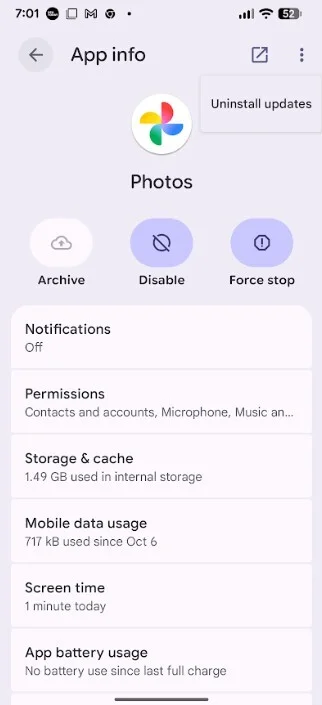
This screenshot shows how to uninstall prior updates from the Google Photos app through device settings. | Image credit: PhoneArena
Why uninstall updates on a system app? It can be useful to revert problematic changes, fix bugs introduced by recent updates, or undo UI modifications you might not like.
Community Feedback on Uninstalling System App Updates
A recent poll showed that 64.75% of participants dislike this new change as it makes the uninstall update process more time-consuming, while 35.25% never uninstall updates on system apps.
New Feature: Remote Installation and Uninstallation of Apps from Play Store
On a more positive note, Google is introducing a handy feature to let you manage apps remotely. Soon, non-system app listings in the Play Store will display all Android devices linked to your Google account. Each device will have buttons labeled Install and Uninstall. By selecting either, you can remotely add or remove apps on that particular device without needing physical access.
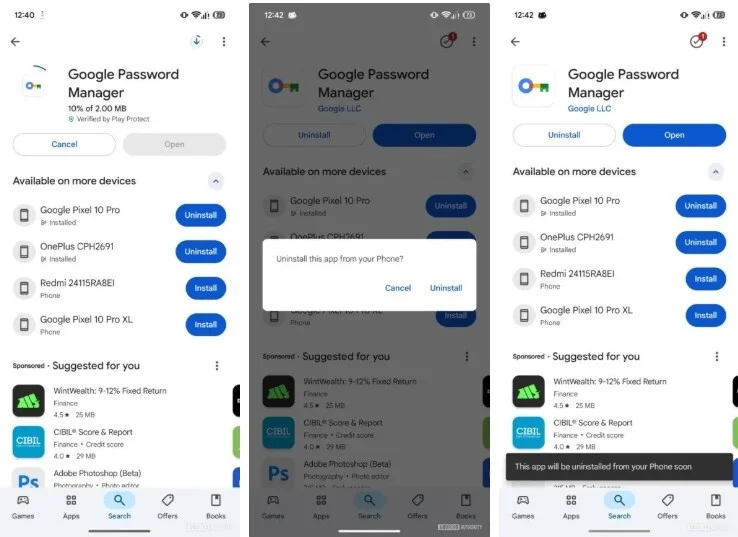
Google will soon allow you to remotely install or uninstall apps from your Android devices via the Play Store. | Image credit: Android Authority
This new remote app management capability adds a level of convenience, especially for users managing multiple devices, and balances out some of the recent inconveniences caused by changes to system app updates management.



