Earlier this week, Google introduced an update to the Gemini app that enhances how responses incorporating Google Maps data are presented. The newly improved interface now prioritizes displaying the map at the beginning of the response rather than at the end, offering users an immediate visual context for their location queries. Additionally, emoji-themed pins on the map distinguish various places, making it easier for users to identify locations at a glance.
Map-First Layout Brings Clarity and Visual Appeal
When Gemini references locations, it now showcases them on an interactive card that begins with a vivid image and a star-based rating. This is followed by detailed textual information. Users can explore further by tapping cards that summarize common discussion points from Google Maps reviews and reveal useful tips from other visitors. This format not only looks aesthetically pleasing but also helps users make faster, better-informed decisions about the places they want to visit.
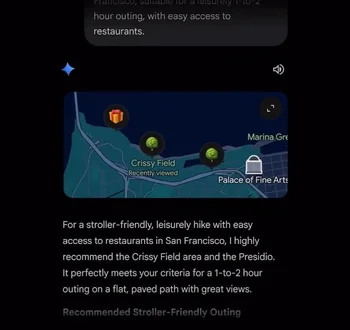

The rationale behind this update is clear: users are better assisted by seeing a map of the requested area immediately, followed by detailed descriptions to support their exploration. This refreshed Google Maps response via Gemini is now rolling out for both mobile and desktop versions of the generative AI app in English.
Gemini: Your Virtual Assistant on Android
If you haven’t installed the Gemini app yet, Android users can download it from the Google Play Store, while iPhone users can find it in the App Store.
User Feedback: Map Position Preference
Poll Results:
- First is best, followed by text: 80%
- Text first, maps last: 0%
- I like it both ways: 20%
- Total votes: 20
Gemini continues to prove itself as a versatile digital assistant by delivering in-depth insights and thorough analysis in response to your queries. It possesses a wide range of knowledge, and on most Android devices running Android 10 or newer, it can set and manage alarms and timers for you. Keep an eye out for these upgraded Google Maps responses, which will significantly enhance your experience finding and choosing locations.


