Modern car safety features have saved countless lives and continue to improve each year. While these systems help prevent accidents, some drivers may find certain functions intrusive or distracting and want to disable them. This guide explains how to effectively turn off driver assistance features in the 2026 Mercedes CLA C174.

Previously, we covered the reasons these safety features exist. Now, we focus specifically on disabling them in select vehicles, starting with the 2026 Mercedes CLA C174. Each manufacturer implements these systems differently, so it's important to understand the unique steps involved.
How to Turn Off Traffic Sign Recognition in the Mercedes CLA
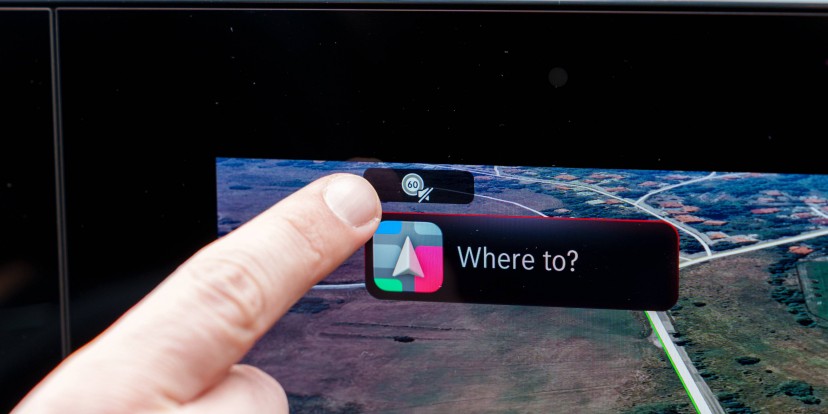
Disabling the traffic sign recognition system is straightforward. When you start the vehicle, a small icon with a traffic sign appears in the upper left corner of the display. This feature is enabled by default and resets each time the car is locked. To turn it off, simply tap the icon. This will prevent the system from beeping and lowering your audio—an especially useful option if you find the alerts distracting.
Disabling Lane Keep Assist and Other Features
To deactivate additional driver assistance functions, more steps are required. On the lower row of buttons on the central display, there is a permanent icon shaped like a car. Pressing this icon opens a menu where you can toggle settings such as lane keep assist, traffic sign recognition, and other safety features.
Within this menu, a settings icon offers access to a deeper configuration panel, allowing comprehensive control over all available driver assistance systems. While not as immediate as the traffic sign recognition toggle, this menu is intuitive and easy to navigate.
Extensive customization options give you control over your vehicle's safety systems.
This article is the first in a series designed to help drivers manage the increasingly complex driver assistance technologies found in modern vehicles, particularly as regulations continue to evolve.



